Background
I've gotten into pottery in the recent year. It's a very rewarding hobby, but while working at a community studio sometimes it's hard to keep track of what you're working on.
I decided that I wanted an app to track my pieces through their stages — thrown, bisqued, glazed — and keep a running photo log of each one. I didn't particularly like most of the apps out there. There would be something missing.
I wanted an app that could do it all:
- Photo-first tracking
- Quickly access and select clay/glaze presets from my local studio
- Cloud-based storage and login so I could preserve my work and use it cross-device
What it does
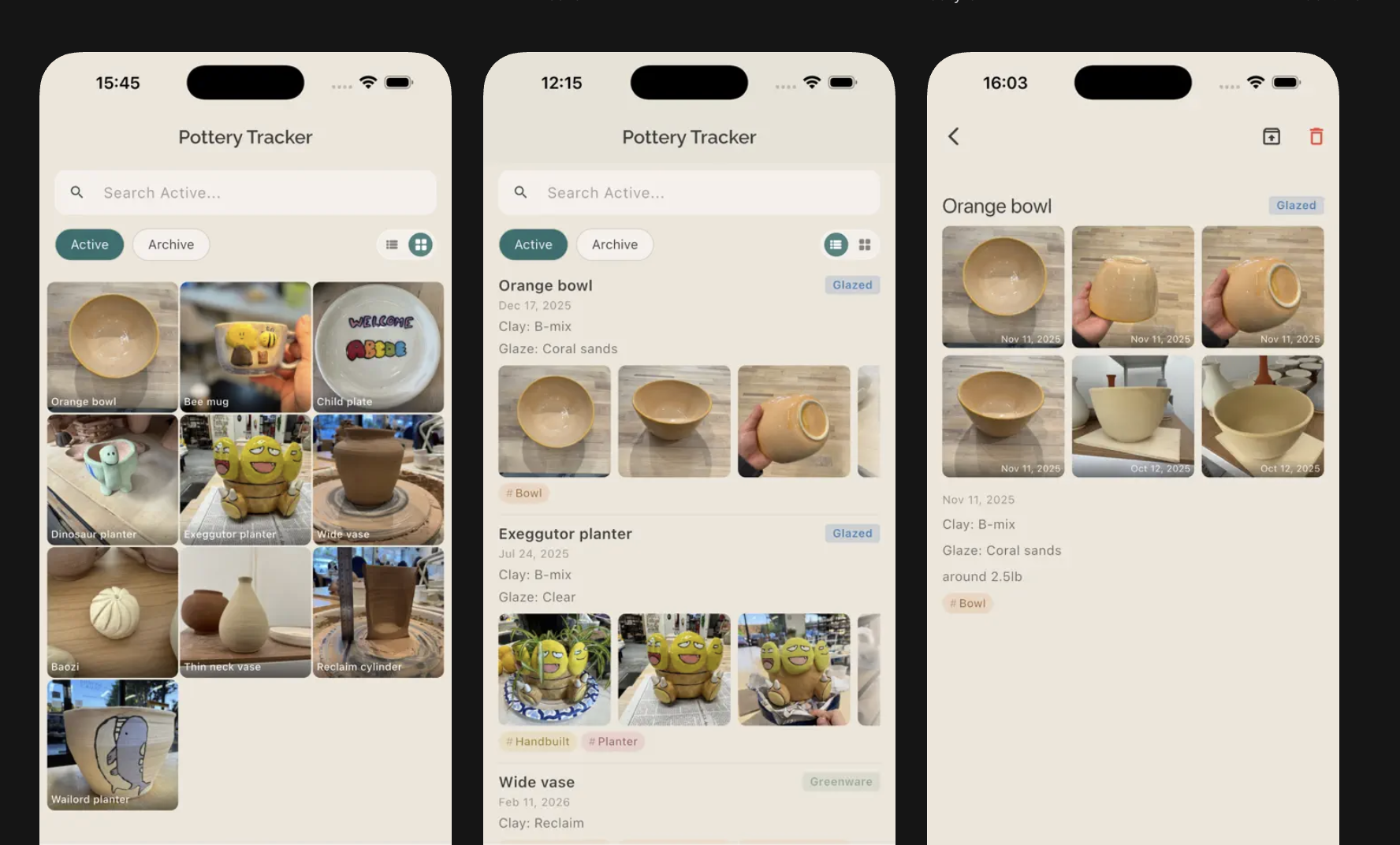
Potter Journal follows each piece through its life cycle with a photo gallery, clay and glaze metadata, and custom tags. You can browse your work in a list view or as an album grid, search across every field, and archive finished pieces without losing them. Sign in with Google or Apple to sync everything to Firebase.
It works fully offline. Sign-in is optional — the cloud backup exists so you don't lose your data if you lose your device, not because the app needs an account to function.
The build, week by week
I thought my ask was relatively simple, but this project took much larger than I anticipated. I had built very small applications in the past, like web apps and Discord bots, so I was familiar with some of the infrastructure needed (like databases and sign in!), but it took a lot of extra elbow grease to actually go from MVP to publishing the app.
- Week 1Feb 12–13
Local-only MVP
SQLite, album grid, saved-options libraries
- Week 2Feb 14–15
Auth, telemetry, CI
Firebase auth, analytics, CI builds
- Week 3Feb 17–18
Sync hardening
54 sync tests, encrypted database
- Week 4Feb 19–22
App Store readiness
Cupertino polish, compliance, edge cases
- LaunchFeb 27–28
Rename & ship
Renamed, submitted, v1.0.2 live
- 1.1Apr 23–27~2 months
Searchable pickers
Searchable clay & glaze pickers
Two focused weeks from first commit to a submittable build, then a 1.1 once the app had earned its own feedback.
Week 1 — local-only MVP (Feb 12–13)
The first commit was a working local-only pottery tracker with SQLite storage and a basic album view. From there I rebuilt the album screen with an active/archive split, added batch photo upload, photo reordering, and editable "last updated" dates. I built saved-options libraries for clay types, glazes, and tags, each with multi-select pickers and rename propagation, so renaming a clay updated every piece using it.
By the end of the week the app had a custom icon, haptic feedback on key actions, and an album grid.
Week 2 — auth, telemetry, CI (Feb 14–15)
I wired up Firebase Auth with Google and Apple Sign-In, then added Crashlytics, Analytics with custom events, and App Check for request attestation. I hardened the Android side and gitignored the Firebase config files.
GitHub Actions ran tests on every push. Xcode Cloud handled iOS builds, which meant a few rounds of fighting with a post-clone script to install Flutter and CocoaPods on the build machine. I added Firebase cloud backup and restore, then deployed Firebase security rules so users could only read and write their own data.
Week 3 — sync hardening (Feb 17–18)
Sync is the part of the app most likely to lose someone's work, so I treated it accordingly. I wrote 54 unit tests across SyncService and SyncNotifier covering per-device sync state, photo upload retries, EXIF stripping fallback, and best-effort uploads when the network is bad.
Then I encrypted the local SQLite database with SQLCipher.
Week 4 — App Store readiness (Feb 19–22)
App Store submission surfaced a long list of small things. Encryption compliance flag in Info.plist. Renaming "Delete All Data" to "Delete Account & Data" and actually deleting the Firebase Auth account. Date handling fixes. Photo download after reinstall. A read-only detail view for archived pieces. Converting every AlertDialog to CupertinoAlertDialog and replacing ScaffoldMessenger snackbars with a custom overlay snackbar so the iOS look stayed consistent.
Launch — rename and ship (Feb 27–28)
The original name was "Pottery Tracker." The App Store had three of those already, so I renamed to "Potter Journal" the night before submission. I also caught a camera crash because I'd forgotten NSCameraUsageDescription in Info.plist — the kind of thing you only find by running on a real device with a fresh install.
Version 1.0.2 shipped on Feb 28.
1.1 — searchable pickers (April 23–27)
After two months of using my own app, the friction point was clear: scrolling through a long list of clays or glazes to add one to a piece. 1.1 replaced the pickers with searchable inputs that show recent suggestions as pills. There was a flicker bug where the search results would re-render on every keystroke — fixing that turned out to be a one-line change (skipLoadingOnReload) once I stopped trying to fix it with debouncing.
How Claude helped
To be very honest, Claude wrote pretty much all of the code. I haven't used a lot of the tech stacks or platforms before this project, like Flutter and Firebase. It's not an exaggeration to say that this project wouldn't have been possible without using an AI coding agent to research solutions and write code for me.
That being said, I made key product decisions and final judgement calls on what the app should do and how it looked. I did a ton of manual testing to get Potter Journal in a working — and dare I say, beautiful — state.
Where Claude was surprisingly useful was the App Store readiness pass. There's a long tail of small platform-specific things (Cupertino vs. Material, Info.plist keys, encryption export compliance, dSYM upload phases for Crashlytics). Claude was able to mostly guide me through settings things up. In hindsight maybe I could've used Playwright or some other browser plug-in to have Claude step through and sign up for things for me, but actions like that are inherently pretty risky. If you're doing anything similar for your own projects, use Claude in Chrome with caution!
Final thoughts
Would I use AI to build my next project? Absolutely. In fact, I'd recommend even the largest AI skeptics at least try to use AI to help them with their projects.
I think everyone thinks of AI as a great coding engineer, but I encourage you to think beyond that. AI can also be a designer, planner, and tester. Push AI to its absolute limits, and step in when it can't continue. Still, use your best judgement on its output and results. Iterate continuously. Have fun!
What's next
I'm pretty happy with what I have right now. I think unless I really level up my pottery skills, the current tracker is quite sufficient for what I need. Perhaps in the future I'll put in different firing options, a calendar representation to see how often I make things, or a share feature that allows people to show things off with a unique link.
If you do pottery, feel free to try Potter Journal out, and use the feedback form built in the app. Thank you!